Why Facebook is Blue in Color?
When you open Facebook, the first thing that you notice is the blue color it uses. Ever wondered why is Facebook so blue in color and not changing its color scheme?
Ever since they started as 'thefacebook', Facebook has stayed with the blue color. Although major changes have been made in the Facebook theme since then, the major unchanged thing has been the blue color.
An exciting fact: In its earlier days, thefacebook.com required you to have an .edu email id to join.
Everywhere from its login page to Facebook groups, you find only blue.
The reason for this is that Mark Zuckerberg, the young founder of Facebook is red-green color-blind and blue is the richest colour for him which he confirmed in an online interview with Leo Laporte.
Another important commercial factor for using blue color is the fact that most colors tend to distract the viewers. Blue on the other hand acts as a transparent background to the main content as visible to the human brain due to which most popular websites tend to use the blue color. It can easily be called a webmaster's favorite color. Blue color is also sometimes referred to as 'Nirvana' for the brain.
All these factors make blue a prominent color on Facebook.
Ever since they started as 'thefacebook', Facebook has stayed with the blue color. Although major changes have been made in the Facebook theme since then, the major unchanged thing has been the blue color.
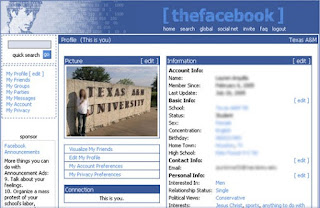 | |
| Facebook from its early days when it was known as thefacebook |
An exciting fact: In its earlier days, thefacebook.com required you to have an .edu email id to join.
Everywhere from its login page to Facebook groups, you find only blue.
 |
| Facebook Login Page. All Blue! |
The reason for this is that Mark Zuckerberg, the young founder of Facebook is red-green color-blind and blue is the richest colour for him which he confirmed in an online interview with Leo Laporte.
Another important commercial factor for using blue color is the fact that most colors tend to distract the viewers. Blue on the other hand acts as a transparent background to the main content as visible to the human brain due to which most popular websites tend to use the blue color. It can easily be called a webmaster's favorite color. Blue color is also sometimes referred to as 'Nirvana' for the brain.
All these factors make blue a prominent color on Facebook.
Comments
Post a Comment